
 View on Asset Store (opens in new tab)
Package details
- Latest version
- 3.0.3
- Last updated
- First released
- Unity version
- 2021.3.24 or later
- Package size
- 259.5 MB
- Files
- 801
- Favorites
- 62
- Views in the past week
- 29
Price tracking
- Last checked
- Tracked since
- Lowest recorded
- $35.00 on
Keywords

Variant Studio XL - Runtime Presets
- Price drop
Variant Studio XL is the ultimate solution for customizing your Prefabs, Components, and Scenes in Unity.
Affiliate link · Purchases support this site
Price history
Last 6 months
USDAsset preview
1 / 12

Variant Studio XL - Runtime Presets screenshot 1


About this asset
🔗 Documentation | Discord | Youtube | Email | WebGL Skate Demo
🥝 What is VARIANT STUDIO XL?
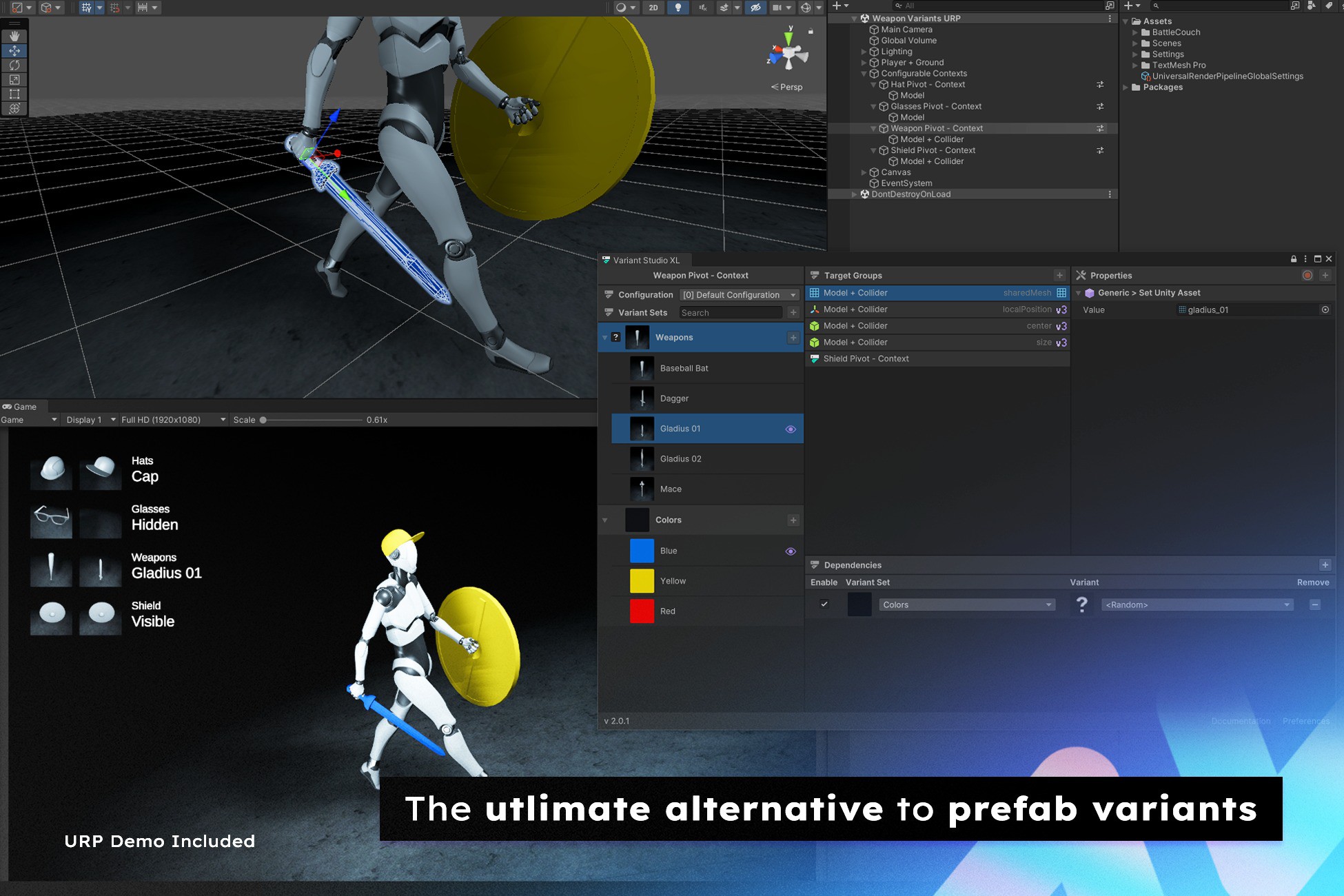
Whether you're looking for an alternative to Prefab/Material Variants or Editor Presets, Variant Studio XL streamlines the process, allowing you to create and manage variations effortlessly. Skip the headache of writing a script for every little detail.
Our tool helps you cut down on repetitive work and spend more time fine-tuning what really matters in your project. Easily set up and manage Prefabs, Components, and Objects variants in Unity.
Meshes, materials, and references of any kind can be swapped out, environment lighting changed, prefabs instantiated, audio clips played, Unity events triggered, and component values tweaked on the fly. VARIANT ANYTHING !!!
Variant Studio XL is built to be Flexible. It lets you break down your data into parts you can reuse, which makes it easier for teams to work together.
Configurations can be applied to children or other instances in a scene. Variant targets can be resolved at runtime using specific tags, IDs, or types and can be extended for custom needs.
Whether you're making Games, working on Industrial Projects, building things like Product Configurators for online stores, or tackling other creative tasks, our versatile tool opens up all sorts of options for you. No coding required!
🐐 Common Use Cases
- Character Customization
- Product Configurator (Car Tuning, Product Showcase, Weapon Attachments, etc)
- Scene Composition (Layout, Cutscene, Mission / Quest Setup)
- State and Transitions (Weather System, Trigger Animations, Audio & Lighting Cues, UI Menus)
- Props Interactions
- Fast Prototyping
⚒️ Core Features
Configurable Contexts
Create nondestructive configurable GameObjects and Scenes across all scales, in both Editor and Runtime using a minimal or advanced setup.
Auto-Capture (Editor)
Capture any variables and shader properties when editing components from the inspector like string, bool, int, float, double, AnimationCurve, Color, Gradient, References, and way more! Including Unity and custom scripts.
Modular Data
Design reusable systems by combining Components and Scriptable Objects within Configurable Contexts to share Targets, Rules, Variants, and Configurations across your project. This modular approach allows you to trigger events across multiple contexts through shared dependencies, while maintaining the flexibility to modify components at runtime.
Variants
Property scripts let you modify specific object groups through Variants. Using Target Groups, you can dynamically change any Unity component's values - including transforms, renderers, and custom scripts. Variants can also trigger events without needing to target specific objects.
Target Groups
Targets can be assigned or resolved dynamically in both Editor and Runtime. Find them by Types, Tags, and more.
MetaSets (Localization)
Localize your data and add extra assets to your VariantSets and Variants. Use thumbnail, color, name, description and more for your runtime UI.
Configurations
Configurations are a list of pre-selected VariantSets and Variants that can be applied to a single or multiple Configurable Contexts. They can also be executed at different times like on Awake, Start, Update or Fixed Update.
Rules & Conditions
Define Rules for VariantSets, Variants, Target Groups or Property scripts to determine if they can be applied when conditions are met. Create interactivity, control customization possibilities or execute events in different scenarios like Quests, Achievements, App Settings, etc.
Availabilities
In-game content can be unlocked or marked as unavailable depending on the player's region, progression, platform, etc. Dynamically change state of your contexts by enabling or disabling VariantSets and Variants.
Tweening
Animate and blend properties combining different variants using Tween Events or Unity Timeline tracks. Select variants on the fly and switch from one state to another instantly. Blend Gradients and AnimationCurve keys!
Thumbnail Generation (UI)
Automatically generate VariantSets and Variants thumbnails texture based on the scene view camera position/rotation.
Extensibility
This solution was developed with flexibility and simplicity in mind, by Unity developers for Unity developers. Create or extend Property scripts, Target Group Resolvers, Conditions and Editor UI using our User Guide and examples. Full C# Source Code Included!
Support
Buying our tools means you will get all future updates and support at no additional cost. One-time payment, perpetual license!
If you have any questions, please join our Discord Server or send us an email.
🧰 Compatibility
- Editor Undo/Redo
- Works in Editor and Runtime
- Works on All Platforms and All Render Pipelines
- Works on IL2CPP and Mono scripting backend
- Supported on Unity 2021.x and Above (Unity 6 ready)
🎉 Third Party Extensions
- SOAP - ScriptableObject Architecture Pattern: property scripts (set target values using SOAP variables, Raise Events), Rule (compare values), Update SOAP values from reference.
- FEEL: property change detection & scripts (play, stop, set variables, etc.)
- DOTween: context/configuration tweening & property scripts
- Playmaker: FSM context & configuration actions, Get/Set (variables, events, states).
- Visual Effect Graph: property change detection & scripts (play, stop, set bool, float, string, etc.)
- Post Processing: property change detection & scripts (set values, objects, etc.)
📦 Demos Included
- Bedroom (Built-in, URP and HDRP)
- Weapon Switching (URP)
- Customizable skateboard (URP) WebGL Skate Demo
- Instantiate & Resolve targets (URP)
- Timeline Transition & Tweening (URP)
- Variant Zone Triggers (URP)
- Create Context at Runtime (URP)
- Interactive Door - Rule & Conditions (URP)
From the publisher's Asset Store listing.
Technical details
Compatibility
- Works in Editor and Runtime
- Works on All Platforms and All Render Pipelines
- Works on IL2CPP and Mono scripting backend
- Supported on Unity 2021.x and Above (Unity 6 ready)
- Support both Dark and Light Editor theme
Auto-Capture Limitations
- Auto-Recording (Editor): functionality is designed to operate with a single selected inspector/GameObject at a time for performance purpose covering most of the properties. However, it can also record simultaneous GameObjects (up to ~50), like Position, Rotation, Scale and Active State. This feature is also only available within the Editor.
Compatibility
| Unity version | Built-in | URP | HDRP | Custom |
|---|---|---|---|---|
| 2021.3.24f1 | Compatible | Compatible | Compatible | Compatible |
As listed on the Asset Store.